Golf Simulators

Golf simulators, designed around the room.

We plan, select, install, calibrate and support golf rooms for homes and suitable commercial spaces — starting with how you swing and what your room allows.

The first question is not which sensor to buy. It is whether the room can comfortably accommodate the player, the swing, and everything around them.

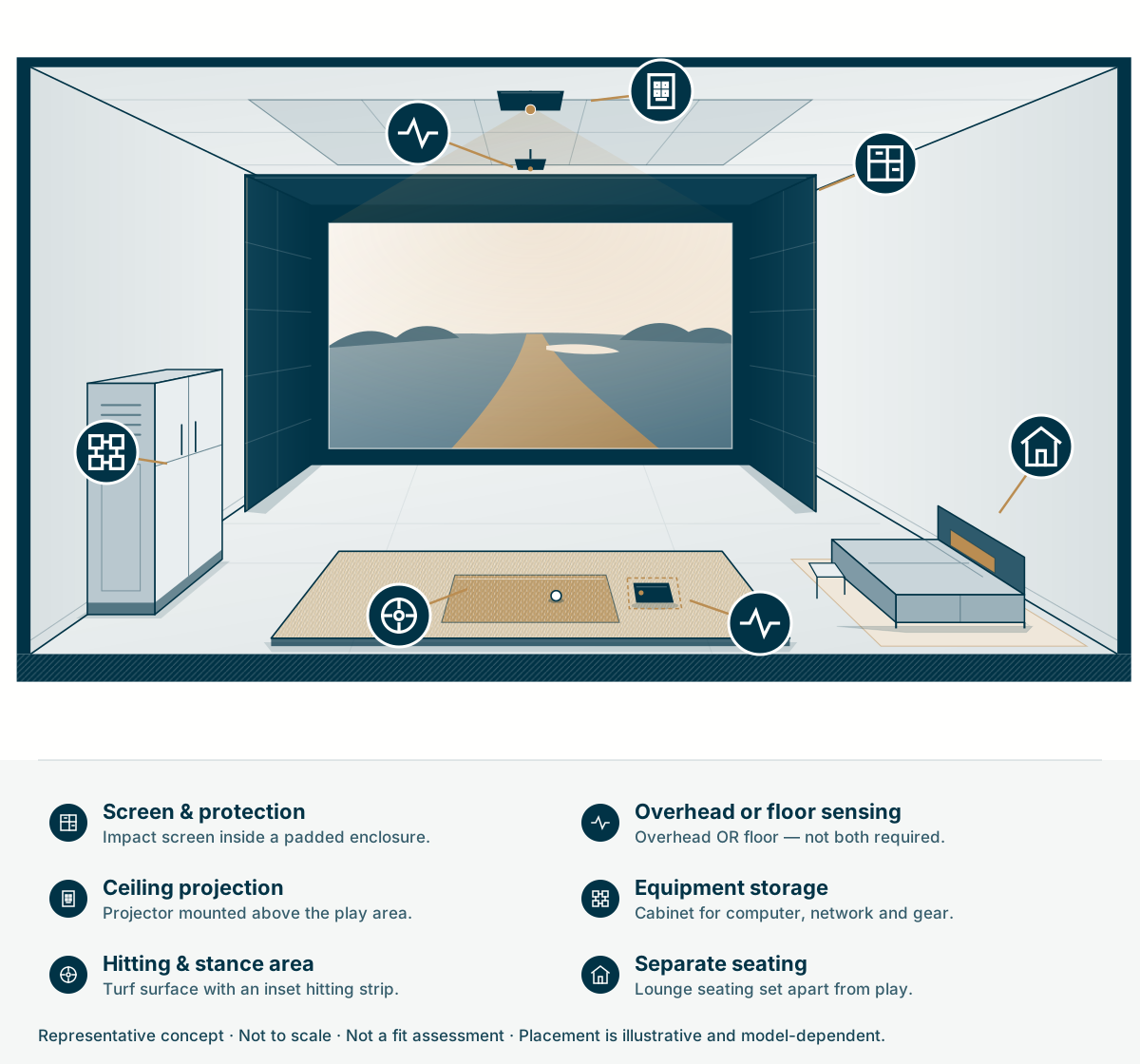
The room, by system

  1. Screen & protection

    Impact screen, padded sides and canopy.

  2. Ceiling projection

    Projector and controlled room lighting.

  3. Hitting & stance area

    Turf with an inset hitting surface.

  4. Alternative sensing positions

    Overhead OR floor — not both required.

  5. Equipment storage

    Computer, network and service access.

  6. Separate seating

    Viewing outside the illustrated play area.

Not to scale. Not a fit assessment. Placement is illustrative and model-dependent.

The complete room

A sensor is where it starts. A room is what you play in.

Each layer is chosen separately — and each one should serve the last. That is the part Devincio is accountable for.

  1. Measures

    Launch monitor

    The sensor that reads ball and, depending on the unit, club data. An instrument — not yet a room.

  2. Plays

    Simulation software

    Courses, practice and analysis. Bundled with some systems, licensed separately or by subscription with others.

  3. Protects

    Screen & enclosure

    Impact surface, side and ceiling protection, and the frame. Where safety and picture quality meet.

  4. Devincio

    Installed room

    Projection, lighting, mat, computer, network, power, acoustics, seating and controls — working as one.

Home or shared

Plan for the people who will play.

For a home

A room the family actually uses.

Planning starts with who plays and how the room is used the rest of the week.

  • Who swings — adults, juniors, guests — and whether left- and right-handed players share the bay.
  • Whether the room doubles as a lounge, theater or gym, and how the screen and mat coexist with that.
  • A clear start-up routine, with coordinated controls where the selected equipment supports them.
  • Sound and light that stay considerate of bedrooms and the rest of the house.

For shared & commercial spaces

Designed for shared use.

Clubs, offices, hospitality and amenity spaces need a plan for frequent use and daily operation.

  • Software licensing for commercial or public use, verified for the exact package before ordering.
  • Durable surfaces and protection planned for frequent, unfamiliar players.
  • Straightforward staff routines for opening, resetting and closing the bay.
  • Viewing, circulation and supervision so waiting players stay clear of the swing zone.

Overhead or floor

Where the sensor sits shapes the room.

These are planning tradeoffs, not brand rules. We check the actual width, depth and height against the players’ swing clearance, the model’s sensing zone and the protection around it. Rough dimensions start the conversation; they do not confirm fit.

Floor & stance

Overhead: Equipment stays off the hitting area.

Floor-positioned: Unit sits on or beside the floor; stance area planned around it.

Left & right-handed play

Overhead: May simplify switching, where the model’s hitting area allows.

Floor-positioned: Changeover may mean moving the unit — model-dependent.

Mounting

Overhead: Needs suitable ceiling structure, pathways and service access.

Floor-positioned: No ceiling mount, but placement relative to the ball matters.

Portability

Overhead: Fixed to the room.

Floor-positioned: Some units travel for outdoor or range use.

Room depth

Overhead: Planned around the model’s sensing zone.

Floor-positioned: Behind-player models need particular attention to depth.

Budget & scope

What affects the work and budget.

Six decisions do most of the work. Knowing them early makes a proposal easy to compare.

  1. Room condition

    Finished or unfinished space, ceiling structure, and whether walls, lighting or flooring change.

  2. Sensor & software package

    Which launch monitor, which software, and any subscriptions or commercial licenses.

  3. Screen & enclosure

    Ready-made enclosure versus a built-in, finished wall and the protection around it.

  4. Projection & image

    Projector throw, player shadows, image size, brightness and control of daylight or fixtures.

  5. Integration

    Lighting, audio, network, computer cooling and service access, with coordinated controls where compatible.

  6. Finish level

    Turf and stance surfaces, seating, millwork and acoustic treatment.

Equipment options

Compare systems that fit your room.

Our equipment supplierCarl's Place

Devincio purchases equipment through Carl's Place (opens in a new tab), our golf simulator supplier, whose offering includes launch monitors and Carl’s own impact screens and enclosures. For any model, we confirm the package, computer or device, software and licenses for your use.

Source note: checked October 1, 2026 against manufacturer pages and the Carl’s Place launch-monitor catalog (opens in a new tab). A catalog listing does not establish Devincio certification, exclusivity, stock availability or support for every model. Equipment, subscriptions and commercial-use rights are confirmed per project.

How we deliver

From empty room to first round, one accountable team.

  1. Design

    Room assessment, use goals, layout, and the protection, projection and lighting plan.

  2. Equipment selection

    Monitor, software, screen, enclosure, computer and accessories recommended as one system.

  3. Installation

    Mounting, enclosure, projection, cabling, network and software configuration.

  4. Calibration & handoff

    Sensor alignment, image setup, test shots and a walkthrough with the owner or staff lead.

  5. Ongoing service

    Support and care for the completed scope, under the applicable terms.

At handoff

What you walk away with.

  • Sensor aligned to the hitting position and target line
  • Image squared, focused and sized to the screen
  • Software accounts and licenses set up for the owner or operating business
  • Lighting and start-up tested using the controls included in your project
  • A walkthrough of start-up, play and shutdown with the owner or staff lead
  • A record of installed equipment, settings and network details

Existing rooms & care

Already have a simulator? Plan its next upgrade.

Tell us the model, the setup and what bothers you. We assess the system — including third-party installs — before recommending work, and keep a record of your room afterwards.

  • Projection refresh

    A brighter or better-placed projector, re-aligned to the existing screen.

  • Screen & protection

    Replacing a worn impact screen or adding side and ceiling protection.

  • Hitting surface

    New mat or turf when the stance or feel has worn down.

  • Control & lighting

    Simpler start-up and lighting scenes, where the existing equipment supports integration.

  • Computer & network

    A computer sized to current software and a steadier connection.

  • Sensor change

    Moving to a different launch monitor once the room is checked for fit.

Questions

Before you plan

The next step

Tell us about the room and who will swing in it.

Rough dimensions, ceiling type, players and handedness, home or commercial use. That is enough to begin.